
What a Commercial Cleaning Service Report Should Include
Almost every janitorial vendor will now tell you they "send reports." Very few send a record that would survive a disagreement. Here is the difference, written from the reports we issue on recurring accounts across Indianapolis.
Looking for a cleaning partner instead of a checklist? See our page on Indianapolis commercial cleaning services.
The situation this solves is specific. A tenant emails you at 8:40 a.m. about a restroom. The cleaning happened at 11 p.m. the night before. Nobody from your team was there, nobody from the vendor's office was there, and the only two people who know what the room looked like are the cleaner who has gone home and the tenant who is upset. Without a record, you are arbitrating between two memories — and you will usually side with the tenant, because they are the one standing in the room.
A service report is not paperwork. It is the artifact that makes that conversation take two minutes instead of two days.
The eight elements that matter
Use this as a spec when you evaluate a vendor's reporting, whoever you hire. If a report is missing more than two of these, it is a summary, not a record.
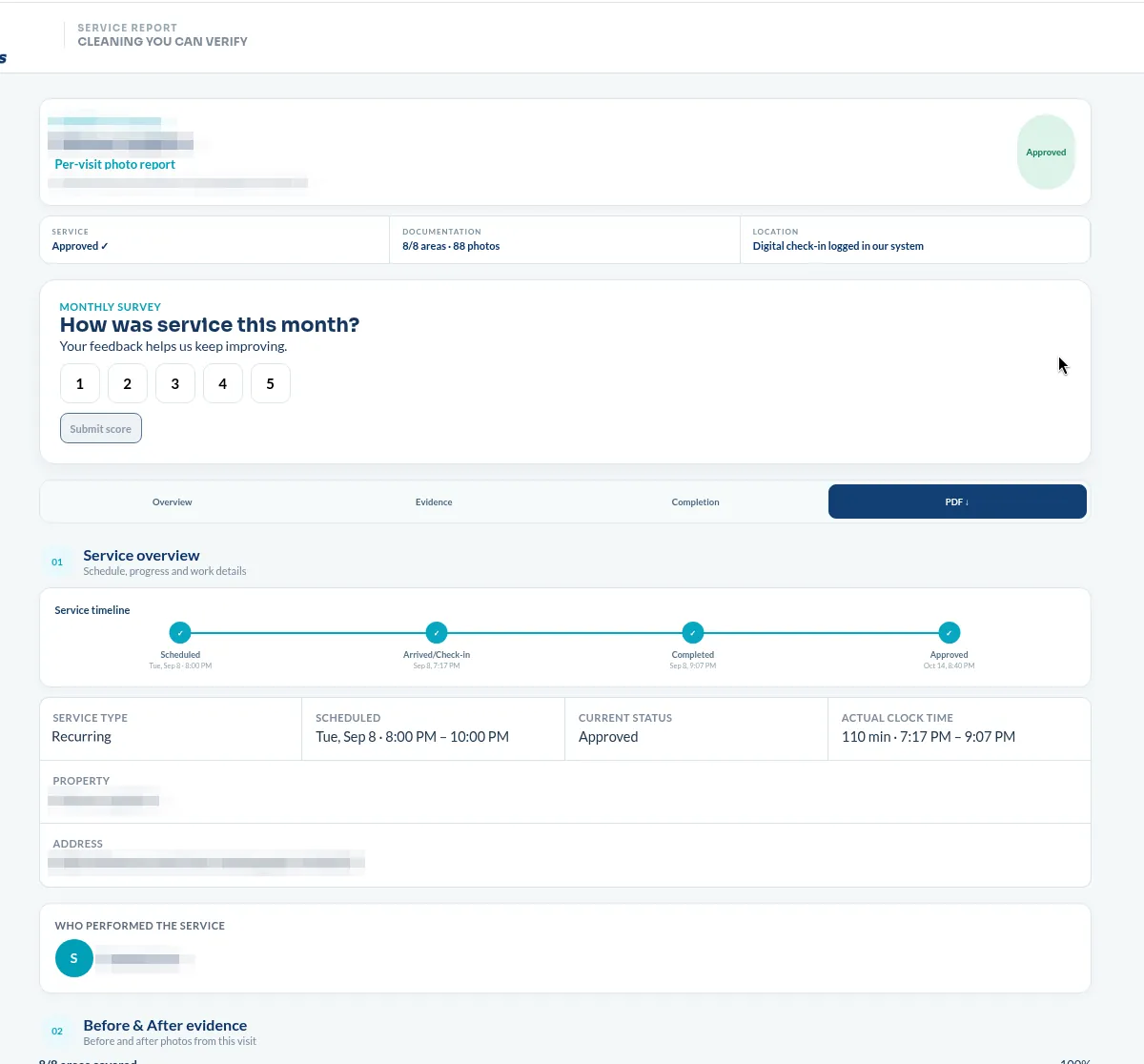
What should not be in it
Reporting can overshoot, and when it does it creates problems instead of solving them.
How to get it into your contract
Reporting that gets added after service starts is usually bolted onto a scope that was never written to support it. Sequence it properly:
- Ask during the walkthrough, not after. The area list in the report is the area list in the scope. Deciding you want per-restroom evidence after the contract is signed means redoing the scope.
- Name the areas you actually get complaints about. Entrances, restrooms, elevator lobbies, fitness rooms. Those are the ones that need their own evidence sets; everything else can be grouped.
- Write the frequency down. Every visit, weekly, or monthly — and whether it is per visit or a rolled-up summary. These are very different products and vendors use the same word for both.
- Confirm the export. Ask to see a PDF from a real account before signing, redacted if necessary.
- Pair it with a response commitment. Documentation without a correction window just tells you what went wrong. Ours: we schedule the correction.
Is it worth paying extra for?
Sometimes vendors price reporting as an add-on. Whether that is reasonable depends on one question: how often are you personally inspecting the building?
If you walk your site daily, documentation is a convenience. If you manage several properties, or a building you visit twice a month, or you report to an owner who asks what they are getting for the line item, the report is doing work you would otherwise do in person. Property managers with portfolios are the ones who ask us for it first, and the reason they give is almost always the same: it is what they forward.
For what it's worth, we include it on recurring multifamily and select commercial accounts rather than metering it, because accounts where nobody is watching are exactly the accounts that go wrong quietly.
One caveat worth naming
Photo documentation proves a space was in a certain condition at a certain moment. It does not prove that a disinfectant sat for its full dwell time, that a mop head was changed, or that anyone dusted above eye level. Those are still training and supervision problems, and any vendor who tells you photos replace supervision is selling you the wrong thing. Documentation makes the result verifiable. It does not make the process self-managing.
Related guides and services
- Commercial cleaning inspection checklist
- How to choose a commercial cleaning company
- Office cleaning checklist
- Apartment common area cleaning
- Office cleaning in Indianapolis
See a real one before you ask a vendor for it
We published an actual client report from a recurring evening account in downtown Indianapolis — 34 photos across four areas, with the timestamp and verification intact — so you know what to hold other bids against.
See the report walkthroughRelated reading
How to choose a commercial cleaning company: 8 questions to ask — reporting is question four of eight.
The office cleaning checklist we use on every Indianapolis site — the scope your report should be organized around.
What commercial cleaning costs in Indianapolis — where documentation sits in a bid.
Commercial cleaning services in Indianapolis — office, warehouse, multifamily, medical, day porter.